glyph-assemble
The moment a picture decides to exist. Order pulling itself out of static. The reveal that earns the cut — or the dissolve that lets the frame come apart in your hands.
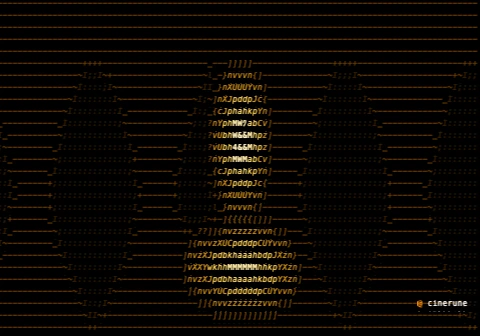
demo.cinerune project.
What it’s for
The hacker-movie boot screen done with restraint. The opening
title that types itself into being. The Matrix rain that
freezes and resolves into a face. glyph-assemble
drives off the segment’s own progress: at the start the
image is a cloud of loose glyphs flung off their cells, and as
the segment plays they fall home until the picture stands
finished — or, run the other way, you watch a clean frame
discorporate back into noise.
What sells it is the order things settle in. Bias the assembly toward the dark cells and the silhouette arrives first, then the detail floods in around it — a figure stepping out of chaos before you can name what it is. The unsettled glyphs can be katakana for that drip-feed cyber feel, binary for cold machinery, or syntax for a thing being compiled into existence.
Reach for this when: a shot needs to arrive rather
than just cut in — set direction to Type-in for an
ordered build that reads as a system coming online, or Scatter
for an image condensing out of pure entropy.
Where it lives in the app
Effect group Transitions & reveals in the effects tray. It is driven by the segment’s playback progress, so its timing follows the clip — and it can be gated by a mask layer to assemble only one region while the rest of the frame holds steady.
Parameters
| Key | Range | Default | Effect |
|---|---|---|---|
direction | Scatter / Type-in | Scatter | Assemble from chaos, or type in order |
scatter | 0–6 | 2 | How far the loose glyphs start out |
settle | 0–1 | 0.25 | How sharply they snap into place |
charset | Katakana / Binary / Syntax | Katakana | Glyph set while unsettled |
bias | 0–1 | 0.4 | Bias toward darker cells assembling first |
Pairs well with
- text-scramble — let a headline decode in the same beat the image assembles. The whole frame resolves at once, like a thought finishing.
- phosphor CRT glow — the settling glyphs leave a faint trail. It stops being a transition and becomes a screen warming up.
- bloom — light blooms off the cells as they lock in. The reveal lands with a flare instead of just appearing.
- palette quantize (Amber) — terminal-yellow glyphs raining into place. Pure “system online” with none of the work showing.
Demo project
The downloadable demo.cinerune
is this single effect applied to Cinerune’s bundled
code-assembly plate — an amber procedural portrait — with
glyph-assemble over it. Drop it into the editor
(File → Open from disk…) to tweak parameters live. The
frame shown above is exported from the same project.