halftone-dots
Front page, screamed in 72-point. The photo someone clipped out of a 1975 paper. Pop-art that knows it’s ink on cheap stock.
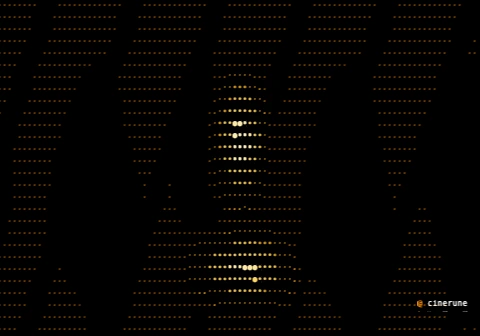
demo.cinerune project.
What it’s for
Before screens, this is how a photograph survived a printing
press: tone broken into dots, big in the shadows, small in the
light, the eye doing the blending. halftone-dots
rebuilds that out of the char ramp — each cell’s luminance
picks a dot size, the darkest cells cut clean to black, and the
whole field can shimmer as the dot sizes pulse, like newsprint
caught mid-press or a Lichtenstein panel that won’t hold
still.
The cut-to-black threshold is the trick that makes it read as print rather than as a filter — real halftone has hard paper-white and hard ink, not a soft grey wash. Quantise the tone into a few hard steps and it’s a wanted poster; leave it continuous and it’s a glossy magazine spread. The shimmer takes it from a still clipping to something alive and slightly editorial.
Reach for this when: a frame should feel printed —
mass-produced, urgent, ironic — turn levels down to
two or three for a stark protest-poster cut, or leave it at zero
for a smooth photo-repro look with just the shimmer breathing.
Where it lives in the app
Effect group Char remap & print in the effects tray. It is a per-cell remap pass and can be gated by a mask layer, so you can drop a halftone treatment onto one subject while the rest of the frame keeps its native ramp.
Parameters
| Key | Range | Default | Effect |
|---|---|---|---|
rampStyle | Dots / Blocks / Blocks + dots / Project ramp | Dots | Which glyph set sizes the dots |
threshold | 0–1 | 0.08 | Luminance below which a cell goes black |
gamma | 0.3–3 | 1.6 | Tone curve of dot growth |
levels | 0–16 | 0 | Quantise tone into N steps (0 = continuous) |
speed | 0–4 | 0.6 | Shimmer animation rate |
shimmer | 0–0.4 | 0.12 | Amount the dot sizes pulse |
Pairs well with
- palette quantize (two-tone) — ink and paper, nothing between. The frame becomes a risograph pull, cheap and loud and intentional.
- text-glitch — a halftone photo with the caption tearing apart reads like a front page someone’s trying to censor in real time.
- paper grain — fibres and tooth under the dots and it stops being a screen and becomes stock you could fold. The single most convincing add.
- slow push-in — drift in on a halftone face and the dots resolve as you approach, exactly the Blow-Up enlargement beat.
Demo project
The downloadable demo.cinerune
is this single effect applied to Cinerune’s bundled
code-assembly plate — an amber procedural portrait — with
halftone-dots over it. Drop it into the editor
(File → Open from disk…) to tweak parameters live. The
frame shown above is exported from the same project.