palette-quantize
For the era you want the audience to feel in their hands before they can name it. The colour of the machine the story was found on.
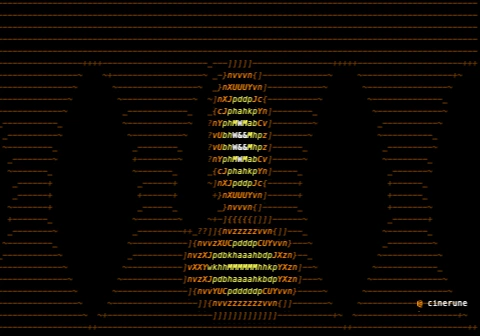
demo.cinerune — palette-quantize over Cinerune’s code-assembly plate.
What it’s for
Colour is the fastest way to set a decade. palette-quantize
throws away the full spectrum and snaps every pixel to one
fixed set — the sixteen hard hues of an ANSI 16
terminal, the single warm channel of an Amber trading
monitor, the phosphor wash of Green, the lurid
four-colour clash of CGA, the four sickly tones of a
Game Boy screen, or the cool grey gradient of
Silver Screen. The image doesn’t get a filter
laid over it; it gets rebuilt out of a smaller box of crayons.
Each palette is a piece of hardware the audience has touched.
Reach for this when: you want a shot to feel recovered from a
specific machine rather than colour-graded toward a mood. Leave
preserveBrightness on and the original luminance
carries through while only the hue collapses — faces stay
readable, the world just changes what it’s made of. Turn
it off for a flatter, harder poster look where light and dark
snap to the palette too.
CGA is 1981 in a single glance. Silver Screen is the picture before colour was invented. The effect is doing period work no LUT can fake, because it’s the constraint, not the tint, that the eye recognises.
Where it lives in the app
Effects tray, group Colour & mood. Add it to any layer and it remaps the cells beneath it. Gate it with a mask layer when you want only part of the frame to fall into the palette while the rest stays full-colour.
Parameters
| Key | Range | Default | Effect |
|---|---|---|---|
palette | ANSI 16 / Amber / Green / CGA / Game Boy / Silver Screen | ANSI 16 | The fixed palette every colour snaps to |
preserveBrightness | Off / On | On | Keep original luminance while remapping hue |
Pairs well with
- text-glitch — Amber on black turns from “market data” to “market data from a backup tape someone found in a basement.”
- phosphor — the Green palette with a CRT afterglow underneath it is a monitor that’s been left on since 1987.
- code-rain-mask — lock the whole frame to Green so the falling code and the image behind it are made of the exact same light.
- scanlines — CGA plus visible scan rows is the look of a game you played before you knew what a frame rate was.
Demo project
The downloadable demo.cinerune
is this single effect applied to Cinerune’s bundled
code-assembly plate — an amber procedural portrait — so you can
watch the same image rebuilt under each palette. Drop it into
the editor (File → Open from disk…) to tweak
parameters live. The frame shown above is exported from the
same project.