phosphor
For the screen someone has been staring at for hours. The light that stays on the glass a beat after the thing that made it is gone.
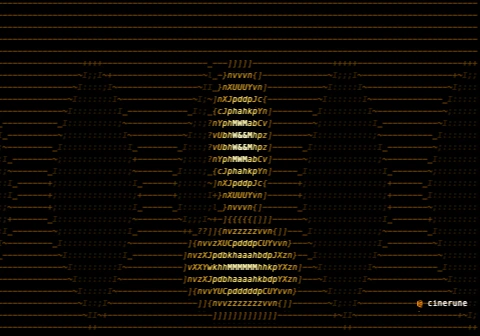
demo.cinerune — phosphor over Cinerune’s code-assembly plate.
What it’s for
Old monitors didn’t cut to black; they let go slowly. A
bright glyph would burn its shape into the phosphor and the
ghost of it would hang there, fading, while the next frame
drew over the top. phosphor rebuilds that
physics — every bright cell leaves a tinted trail behind it
that decays over the following frames, so motion smears into a
comet of light instead of snapping cleanly.
This is the texture of fatigue and of analog time. A radar
sweep. A cursor blinking in a dark room at 4am. The HUD of a
machine that’s been running too long. Reach for this
when: you want stillness to feel like exhaustion and motion to
feel like it costs something. A short depth with
fast decay is a crisp, healthy tube; a long
depth with decay near 0.95 is a
burned-in screen that’s never been turned off.
The default tint leans toward the cool green of a vector
display, but the three tint channels let you walk
it anywhere — sodium-amber for a terminal, sickly cyan for
something medical, pushed-red for an alarm state.
Where it lives in the app
Effects tray, group Brightness & alpha. Add it to any layer; it accumulates across frames, so it reads best on moving content. Gate it with a mask layer to keep the afterglow on a single element while the rest of the frame stays instant.
Parameters
| Key | Range | Default | Effect |
|---|---|---|---|
depth | 1–16 | 8 | Trail length in frames |
decay | 0.3–0.95 | 0.85 | How slowly the ghost fades |
tintR | 0–255 | 120 | Afterglow tint, red |
tintG | 0–255 | 255 | Afterglow tint, green |
tintB | 0–255 | 150 | Afterglow tint, blue |
Pairs well with
- text-glitch — the after-image a real arcade monitor leaves on the eye. Together they read like a screen you stared at for hours.
- palette quantize (Green) — lock the colour to phosphor green and the trail stops being an effect and becomes the actual hardware.
- twirl — let the vortex smear and the afterglow turns the spin into a long-exposure of a fairground at night.
- code-rain-mask — the rain stops looking clean and starts looking tired, like a console nobody has slept in front of.
Demo project
The downloadable demo.cinerune
is this single effect applied to Cinerune’s bundled
code-assembly plate — an amber procedural portrait — animated
enough that the trail has something to chase. Drop it into the
editor (File → Open from disk…) to tweak parameters
live. The frame shown above is exported from the same project.